

BEST Verified Apple Apple-Device-Support Exam Questions (2024)
The Best Practice Test Preparation for the Apple-Device-Support Certification Exam
NEW QUESTION # 16
Select two.
What methods can you use to lock notes in the Notes app?
- A. Apple ID password
- B. Mac Login Password
- C. PIN
- D. Face ID
- E. Custom Notes Password
Answer: D,E
Explanation:
In the Notes app, you can lock notes to protect your sensitive information. You can access your locked notes using your device passcode or a custom password. If you have multiple Notes accounts, you choose the locking method for each account (for example, your iCloud account). You can also use Face ID or Touch ID to access your locked notes, if you enable this option in the settings. To lock notes with a custom password, you need to go to Settings > Notes > Password, choose an account, and tap Use Custom Password. To lock notes with Face ID, you need to go to Settings > Notes > Password, choose an account, and turn on Face ID. To lock or unlock a note, you need to tap the More button and then tap the Lock icon. You can also lock or unlock all notes in the Notes app by tapping the Lock icon in the bottom toolbar. References: Lock your notes on iPhone
- Apple Support, How to Lock Your Secrets in the Notes App (and Why You Should) - Lifehacker
NEW QUESTION # 17
You're ready to transfer a sysdiagnose from your iPad to your Mac.
Where in System Settings can you locate the log file on iPad?
- A. General > Analytics & Improvements > Analytics Data
- B. Analytics > Analytics Data
- C. Privacy & Security > Analytics & Improvements > Analytics Data
- D. Logging > Debug Logging
Answer: C
Explanation:
Sysdiagnose is a tool that extracts information from iOS or iPadOS devices and captures it in a log file. You can use sysdiagnose to troubleshoot general issues or report them to AppleCare. To run sysdiagnose, you can either press and hold both volume buttons and the side or top button on iPad for 1 to 1.5 seconds, or use AssistiveTouch to select Analytics from the Top Level Menu. After sysdiagnose finishes, you can find the log file in Settings > Privacy & Security > Analytics & Improvements > Analytics Data. The log file name starts with "sysdiagnose" and includes the date and time of the capture. You can then transfer the log file to your Mac via AirDrop or USB. References: = Using Sysdiagnose to Troubleshoot iOS or iPadOS; Gathering a Sysdiagnose from an iPadOS or iOS device; Apple Device Support Exam Prep Guide, page 10.
NEW QUESTION # 18
Where do you delete users in System Settings?
- A. Navigate to System Settings -Users & Groups.
- B. Click the (i) button next to the user you would like to delete on Mac.
- C. Select Delete Account.
Answer: B
NEW QUESTION # 19
Match the Apple Configurator actions on the left to the descriptions on the right by dragging the responses to the correct target areas. Responses may be used once, more than once, or not at all.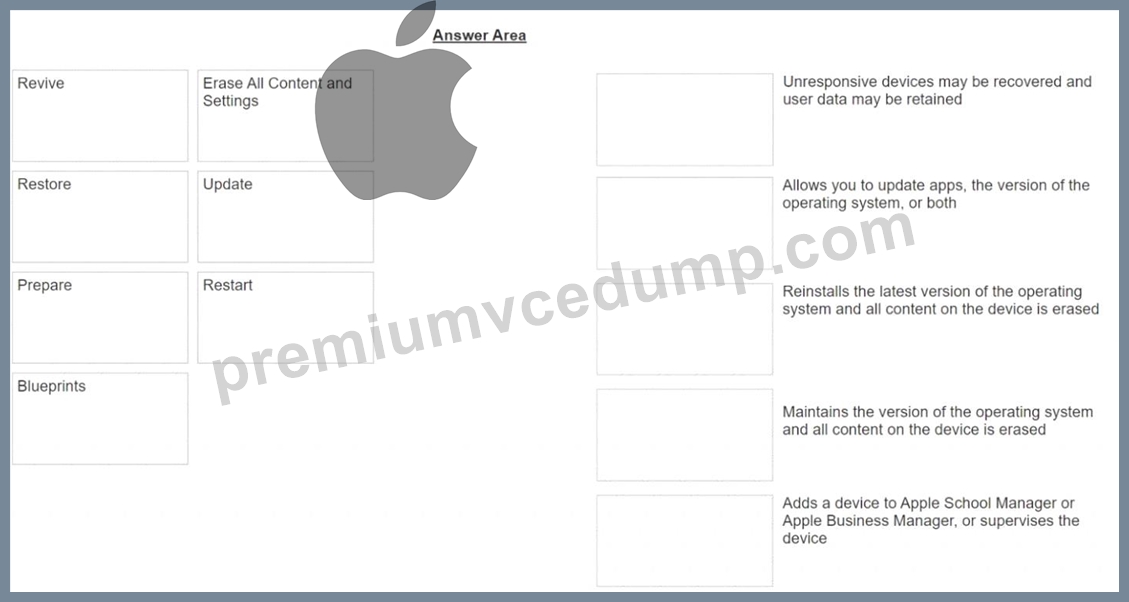
Answer:
Explanation: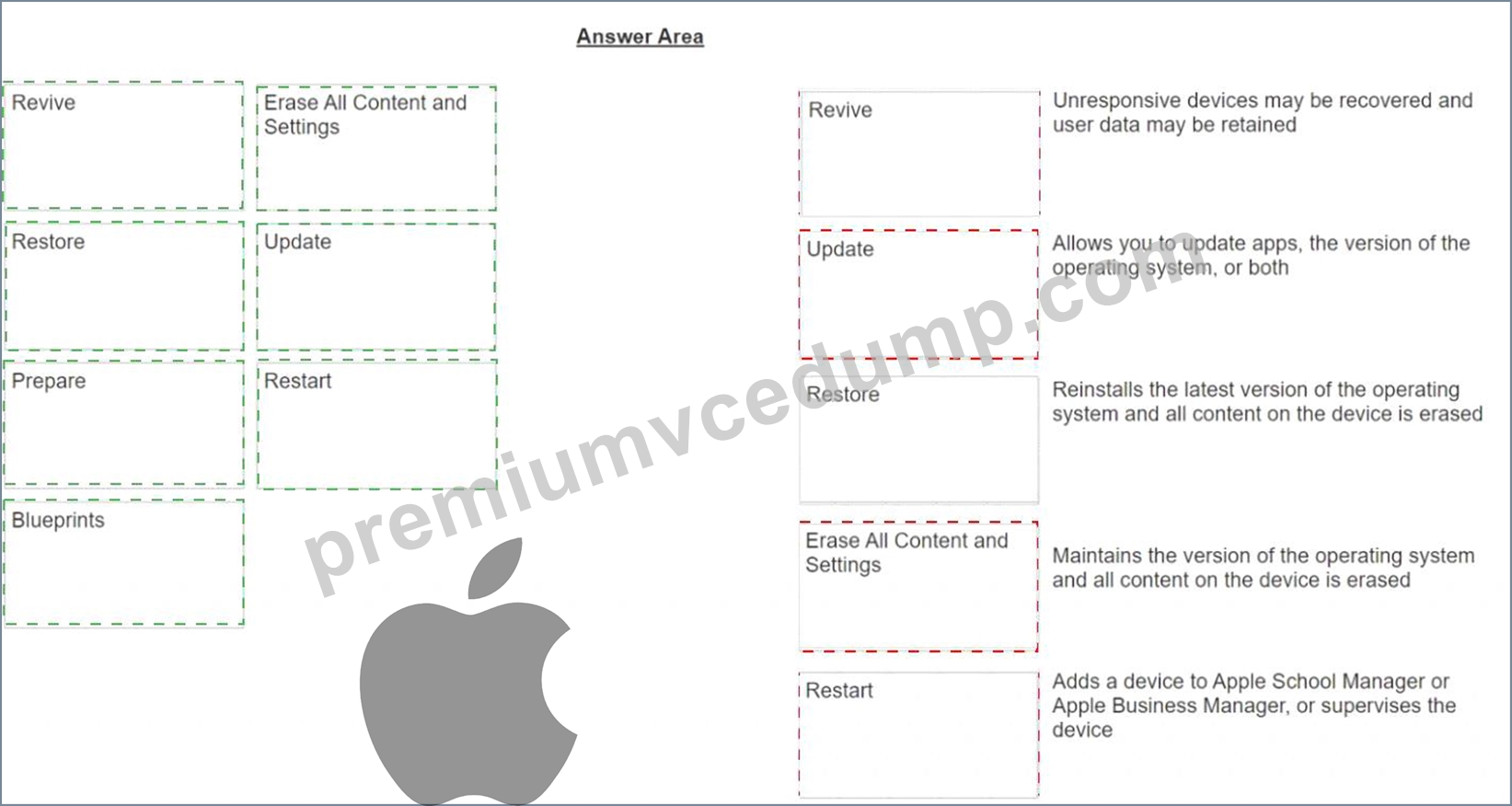
Explanation
A screenshot of a computer Description automatically generated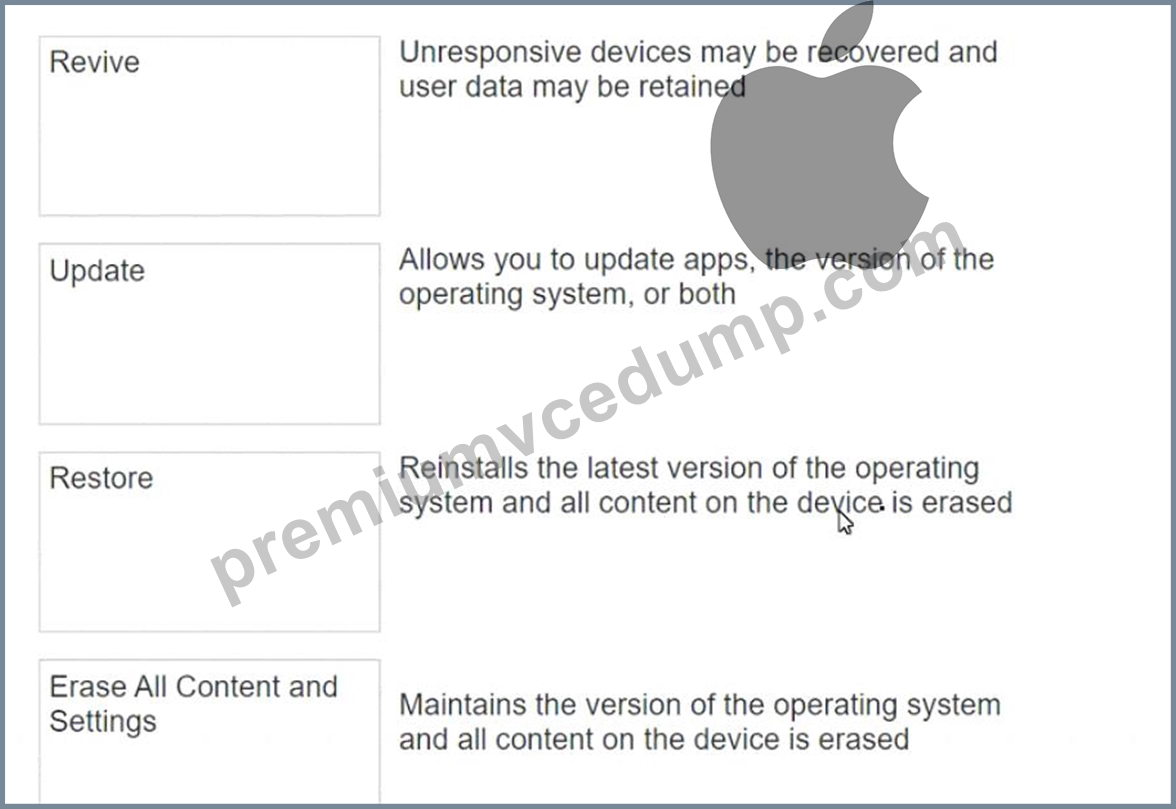
A close up of a text Description automatically generated
NEW QUESTION # 20
Use this image to answer the question.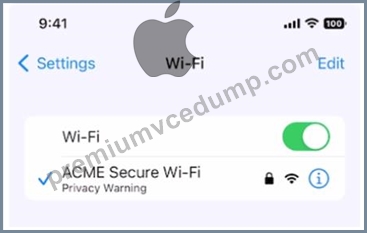
What does this iPhone Privacy Warning message indicate?
- A. Limit IP Address Tracking is disabled for this network
- B. Local network access is enabled for a third-party app
- C. iOS has detected a spoofed MAC address on the network
- D. Private Wi-Fi Address is disabled for this network
Answer: D
NEW QUESTION # 21
Select the setting in the sidebar that you should use to delete a user on your Mac.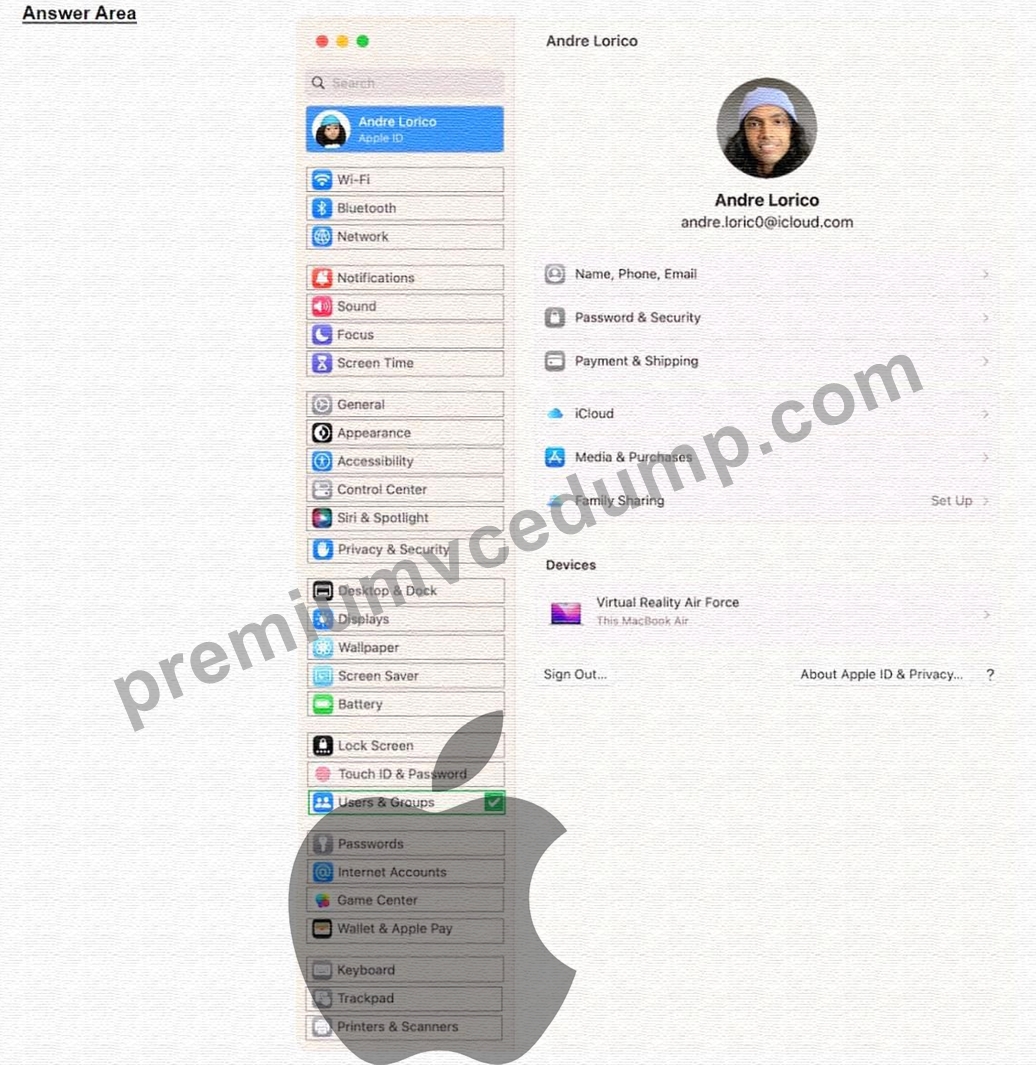
Answer:
Explanation: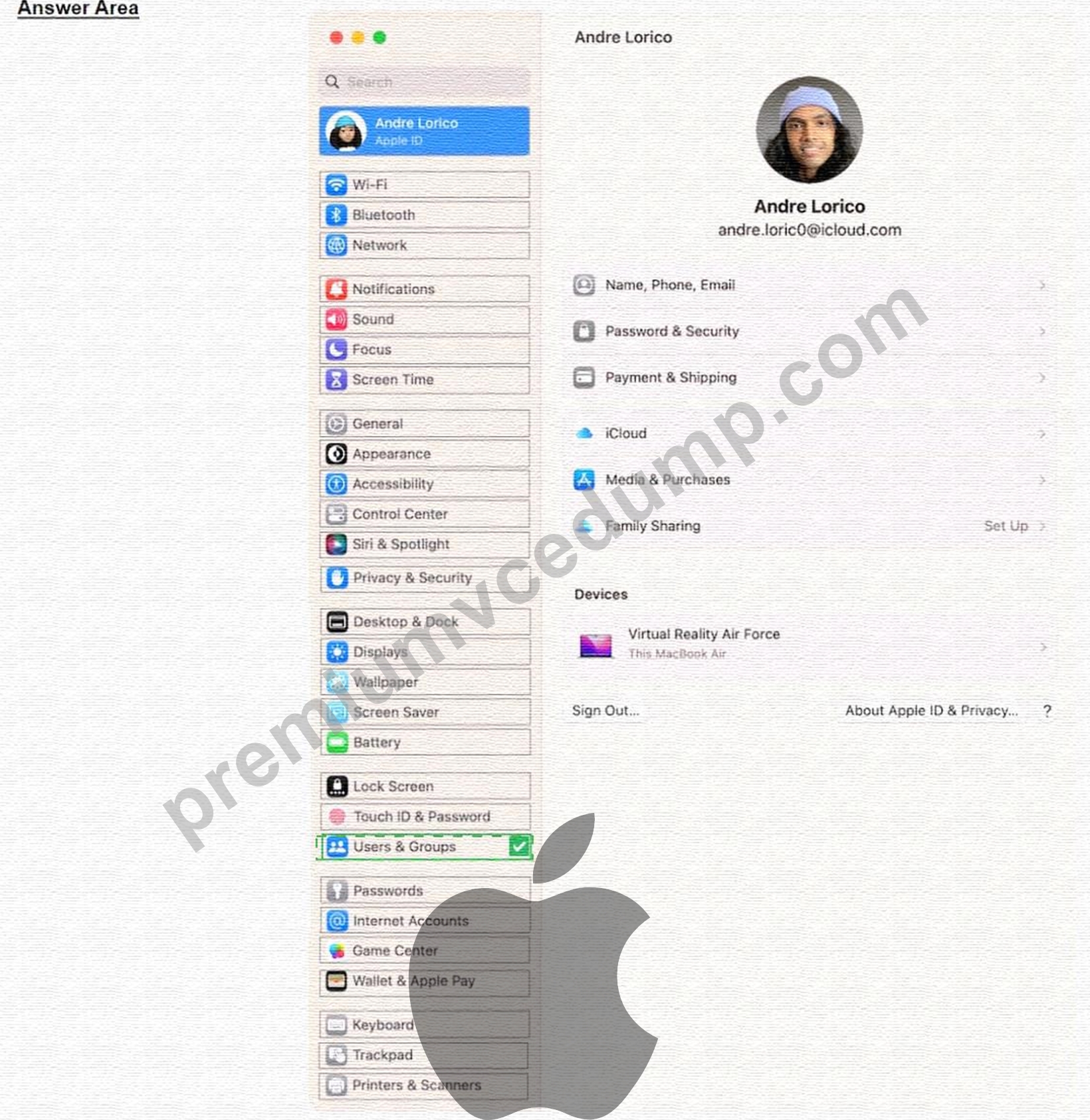
Explanation:
https://support.apple.com/guide/mac-help/delete-a-user-or-group-mchlp1557/mac#:~:text=On%20your%20Mac% On your Mac, choose Apple menu > System Settings, then click Users & Groups in the sidebar. (You may need to scroll down.) Click the Info button next to the user or group you want to delete, then click Delete User or Delete Group. Note: If a user is logged in to this Mac now, you can't select them.
NEW QUESTION # 22
Select the setting in the sidebar that you should use to turn on Find My on your Mac.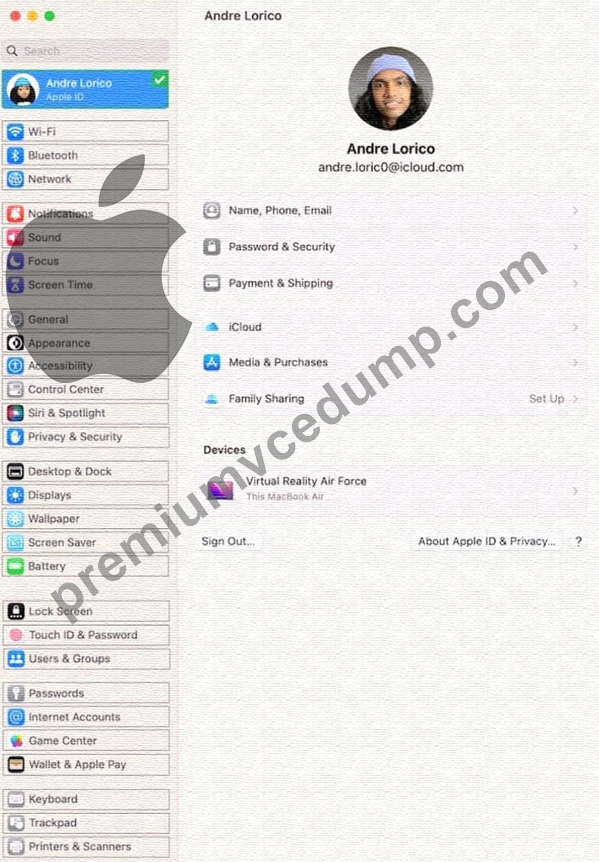
Answer:
Explanation: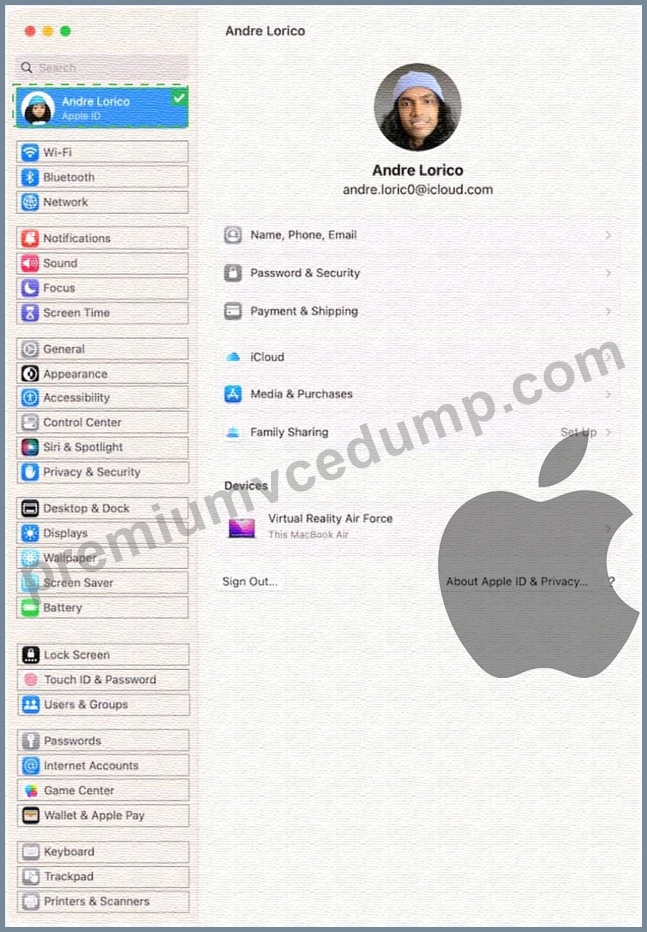
Explanation
Turn on Find My Mac in iCloud settings so you can locate, lock, or erase your Mac.
On your Mac, choose Apple menu > System Settings, then click [your name] at the top of the sidebar. ...
Click iCloud on the right, then click Find My Mac.
https://support.apple.com/guide/findmy-mac/set-up-fmm53101237/mac
NEW QUESTION # 23
ACME, Inc.'s administrators are planning to switch to an eSIM exclusive environment. Users are upgrading their iPhone with models that support ONLY eSIM.
Which feature MUST ACME'S carrier support so that users can seamlessly continue to use their lines with eSIM-only iPhone models?
- A. eSIM Carrier Transfer
- B. eSIM Quick Transfer
- C. eSIM Convert
- D. eSIM Plan Transfer
Answer: B
Explanation:
eSIM Quick Transfer is a feature that allows users to transfer their phone number from their previous iPhone to their new iPhone without contacting their carrier. This feature also enables users to convert their physical SIM to an eSIM on the same iPhone, if their carrier supports it. eSIM Quick Transfer is supported by some carriers and worldwide service providers, and requires both iPhones to be signed in with the same Apple ID, unlocked, nearby with Bluetooth turned on, and running iOS 16 or later. eSIM Quick Transfer is the most convenient and seamless way for users to continue using their lines with eSIM-only iPhone models. References:
* About eSIM on iPhone - Apple Support
* How to transfer eSIM to new iPhone: 4 Ways explained!
* How to set up or transfer an eSIM on iPhone - XDA Developers
NEW QUESTION # 24
How many incorrect password attempts does a Managed Apple ID allow before you're locked out of the account?
- A. Three
- B. Seven
- C. Ten
- D. Five
Answer: A
Explanation:
A Managed Apple ID is a type of Apple ID that is created and managed by an organization, such as a school or a business. It allows users to access Apple services, such as iCloud, iTunes U, and Apple School Manager.
A Managed Apple ID has different password policies than a regular Apple ID. According to the Apple Business Manager User Guide, one of the password policies for a Managed Apple ID is that "after three incorrect attempts, the account is locked for one hour." This means that if a user enters the wrong password three times in a row, they will not be able to sign in with their Managed Apple ID for the next 60 minutes.
This policy is designed to prevent unauthorized access and protect the user's data and privacy. References: Use Managed Apple IDs in the Apple Business Manager User Guide
NEW QUESTION # 25
Scenario
You're trying to connect a podcasting microphone to your MacBook Air. You're using the Apple USB-C Digital AV Multiport Adapter connected to a standard USB A to B cable that connects to the microphone. You open Sound in System Settings and click the input tab. but the microphone doesn't appear in the sound input device list.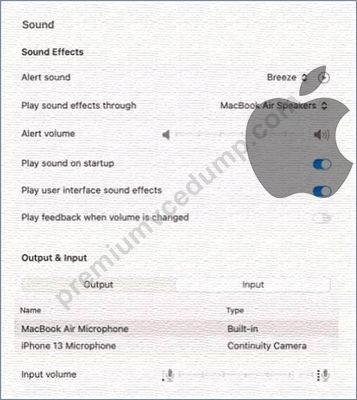
What should you use to verify that your Mac has successfully connected to the microphone?
- A. VoiceOver Utility > Sound > Input Device > USB CODEC
- B. System Information > Hardware > USB
- C. The device driver settings
- D. The microphone's power light
Answer: B
NEW QUESTION # 26
What MUST you do before you reach the macOS Recovery options when your Mac with Apple silicon has FileVault or Activation Lock turned on?
- A. Enter the FileVault recovery key, then select an administrator user account.
- B. Access the Startup Security Utility and enter the administrator's six-digit passcode to unlock the system.
- C. Select one of the displayed administrator accounts, then provide the account's password.
- D. Log in using the administrator's Apple ID and two-factor authentication.
Answer: C
Explanation:
Before you can access the macOS Recovery options on a Mac with Apple silicon that has FileVault or Activation Lock turned on, you must first authenticate as an administrator. This is because FileVault and Activation Lock are security features that encrypt your data and prevent unauthorized access to your Mac. To authenticate as an administrator, you need to select one of the displayed administrator accounts on the startup options screen, then enter the account's password. This will unlock the system and allow you to use the macOS Recovery apps and utilities. The other options are not correct. You do not need to access the Startup Security Utility or enter the FileVault recovery key or the Apple ID and two-factor authentication to reach the macOS Recovery options. References: Use macOS Recovery on a Mac with Apple silicon - Apple Support, How to Enter macOS Recovery on an Apple Silicon Mac - MUO
NEW QUESTION # 27
Use this image to answer the question.
What should you do if you forgot your passcode and your iPhone is disabled?
- A. Connect your iPhone to your Mac, then use Apple Configurator to revive the device.
- B. Wait until the Forgot Passcode? message appears, then follow the instructions.
- C. Force shutdown your iPhone and wait 10 seconds, then turn it back on.
- D. Put your iPhone in recovery mode, then connect it to your Mac or PC to restore it.
Answer: B
NEW QUESTION # 28
You're reviewing the manual page for the defaults command in Terminal.
What should you do to exit a manual page in the Terminal window?
- A. Press the Esc key
- B. Type Exit and Press the Return key
- C. Press the Q key
- D. Press the Control-X keys
Answer: C
NEW QUESTION # 29
Which service should you use to grant access to your Apple account to others after your death?
- A. Account Successor
- B. Apple ID Proxy
- C. Forever Apple ID
- D. Legacy Contact
Answer: D
Explanation:
Legacy Contact is a new feature introduced by Apple in iOS 15.2, iPadOS 15.2, and macOS 12.1 that allows users to designate up to five people who can access their Apple account and data after they pass away. Legacy Contacts need to have the unique access key that the user created when they added them as a Legacy Contact, and a copy of the user's death certificate, to request access to the user's account. Legacy Contacts can access data stored in iCloud, such as photos and documents, but not services that require subscriptions, such as Apple Music or Apple TV+. The other options are not valid services offered by Apple. References: How to request access to a deceased family member's Apple account, How to set up Apple account access so people can get in after you die
NEW QUESTION # 30
ACME, Inc. wants all users to see mounted servers in the Finder by default.
Which terminal command should you use to modify the Finder preferences to display mounted servers?
- A. defaults cat com.apple.finder ShowMountedServersOnDesktop true
- B. defaults append ShowMountedServersOnDesktop com.apple.finder true
- C. defaults write com.apple.finder ShowMountedServersOnDesktop true
- D. defaults read com.apple.finder ShowMountedServersOnDesktop true
Answer: C
Explanation:
The terminal command defaults write com.apple.finder ShowMountedServersOnDesktop true sets the Finder preference to show mounted servers on the desktop. This is equivalent to checking the box for "Connected Servers" in the Finder settings under the General tab. The other commands are either invalid or do not change the preference value.
* defaults read com.apple.finder ShowMountedServersOnDesktop true reads the current value of the preference, but does not modify it.
* defaults cat com.apple.finder ShowMountedServersOnDesktop true is not a valid command, as cat is not a valid subcommand for defaults.
* defaults append ShowMountedServersOnDesktop com.apple.finder true appends the value true to the preference key ShowMountedServersOnDesktop, which is not a valid operation, as the preference value should be a boolean, not a list. References:
* Apple Device Support Exam Prep Guide, page 11
* Change Finder settings on Mac
* How to show Hard Disk icon on Desktop via Terminal?
NEW QUESTION # 31
Select three responses.
Which three conditions might require you to enter your passcode instead of using Face ID?
- A. The passcode has been entered incorrectly 5 times.
- B. The device hasn't been unlocked for more than 48 hours.
- C. The device was in sleep for more than 8 hours.
- D. The device has just been turned on or restarted.
- E. The passcode hasn't been used to unlock the device in the last six and a half days and Face ID hasn't unlocked the device in the last 4 hours.
Answer: A,D,E
NEW QUESTION # 32
How do you quit out of a man page in Terminal Mac?
- A. clear
- B. q
- C. less
- D. esc
Answer: B
NEW QUESTION # 33
Scenario
You're trying to connect a podcasting microphone to your MacBook Air. You're using the Apple USB-C Digital AV Multiport Adapter connected to a standard USB A to B cable that connects to the microphone. You open Sound in System Settings and click the input tab. but the microphone doesn't appear in the sound input device list.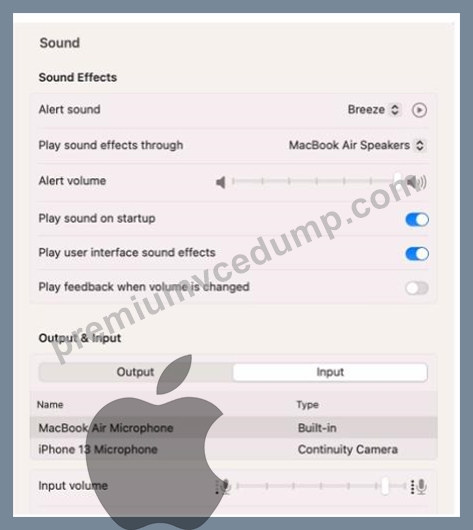
What should you use to verify that your Mac has successfully connected to the microphone?
- A. VoiceOver Utility > Sound > Input Device > USB CODEC
- B. System Information > Hardware > USB
- C. The device driver settings
- D. The microphone's power light
Answer: B
NEW QUESTION # 34
Scenario
You're setting up a new MacBook Pro to replace your current MacBook. Both Mac computers are using the current version of macOS.
Which utility should you use to move data from your current MacBook to your new Mac using Setup Assistant?
- A. Transfer Data
- B. Migration Assistant
- C. Time Machine
- D. Transfer Information
Answer: B
NEW QUESTION # 35
Select the setting in the sidebar that you should use to turn on Lockdown Mode.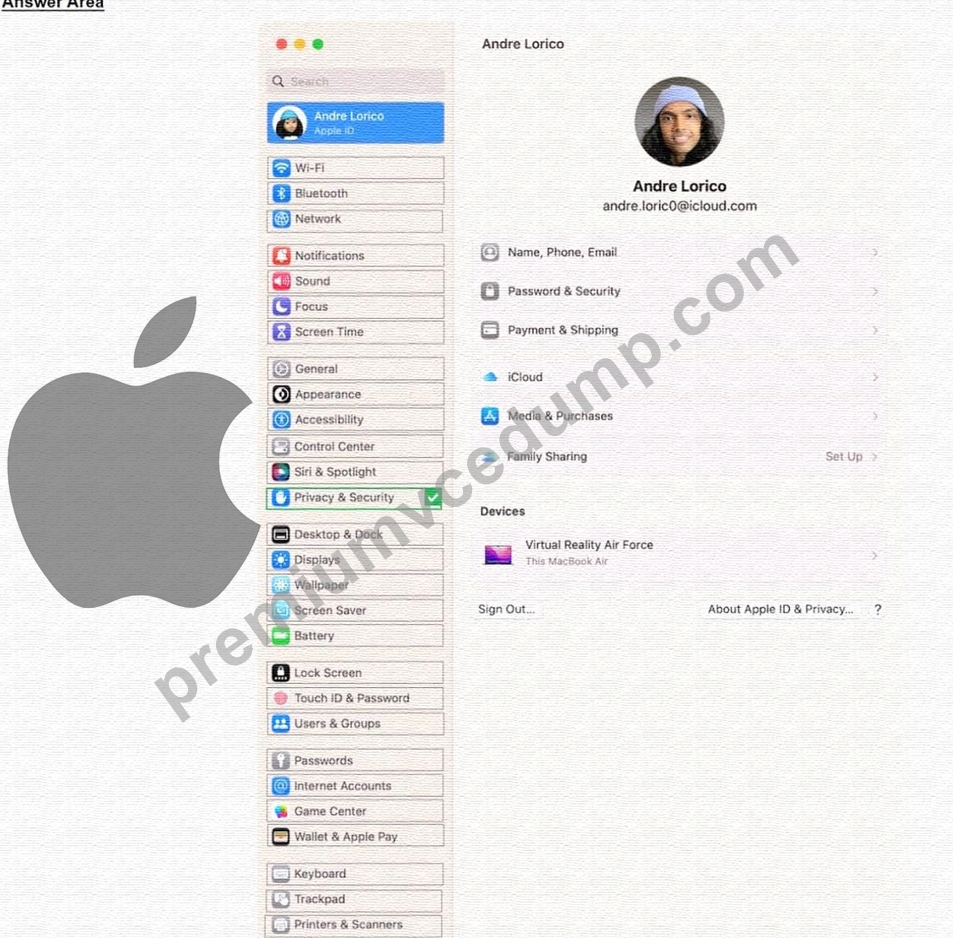
Answer:
Explanation: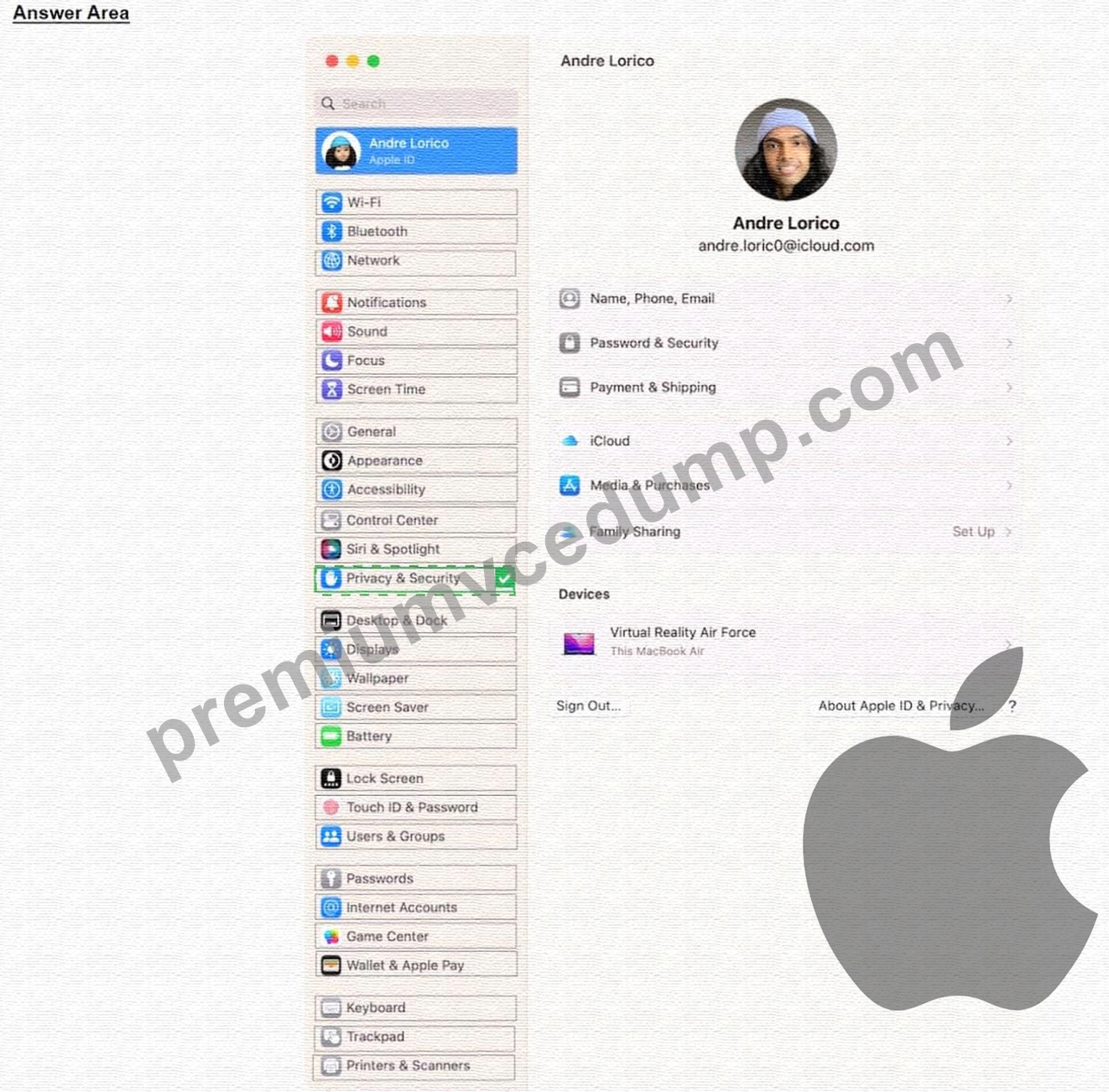
Explanation:
From the sidebar, click Privacy & Security. Scroll down, click Lockdown Mode, then click Turn On.
https://support.apple.com/en-us/105120#:~:text=From%20the%20sidebar%2C%20click%20Privacy,Mode%2C%
NEW QUESTION # 36
Which screen indicates that iPhone is in recovery mode and ready to be updated or restored?
- A.

- B.

- C.

- D.

Answer: D
NEW QUESTION # 37
What are two features of two-factor authentication for a personal Apple ID?
- A. It doesn't require the Apple ID password.
- B. It uses a four-digit passcode to access a user's account.
- C. It requires a special app on the trusted device.
- D. It can be accessed on trusted devices.
- E. It ensures that only the account's owner can access the account.
Answer: D,E
NEW QUESTION # 38
If you need to sync data from iCIoud to your Windows PC, what must you do?
- A. Download iCIoud on your PC and manually start the transfer.
- B. Download the files and send them to your PC manually.
- C. Airdrop the files to your PC.
- D. Download iCIoud for Windows from the Microsoft Store.
Answer: D
NEW QUESTION # 39
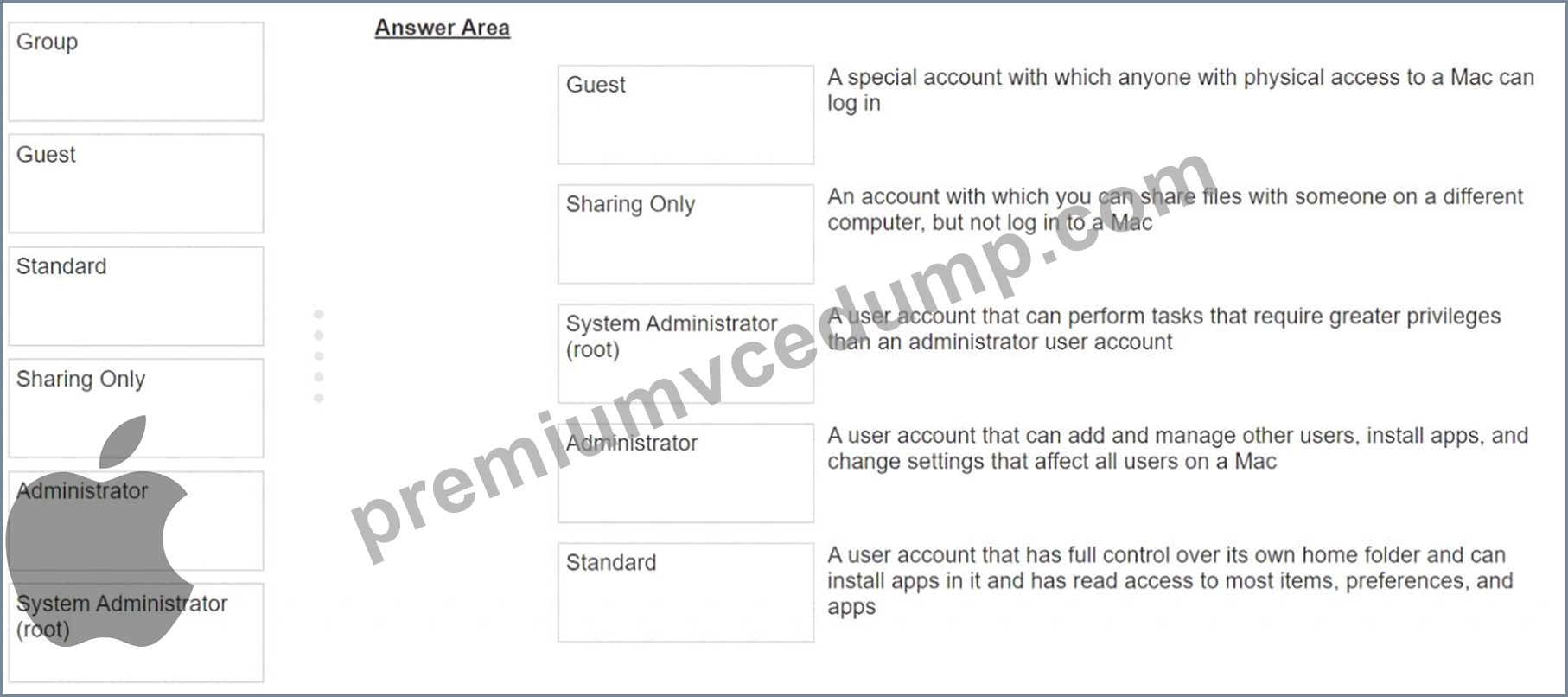
Match the user types on the left to the descriptions on the right by dragging the responses to the correct target areas. Responses may be used once, more than once, or not at all.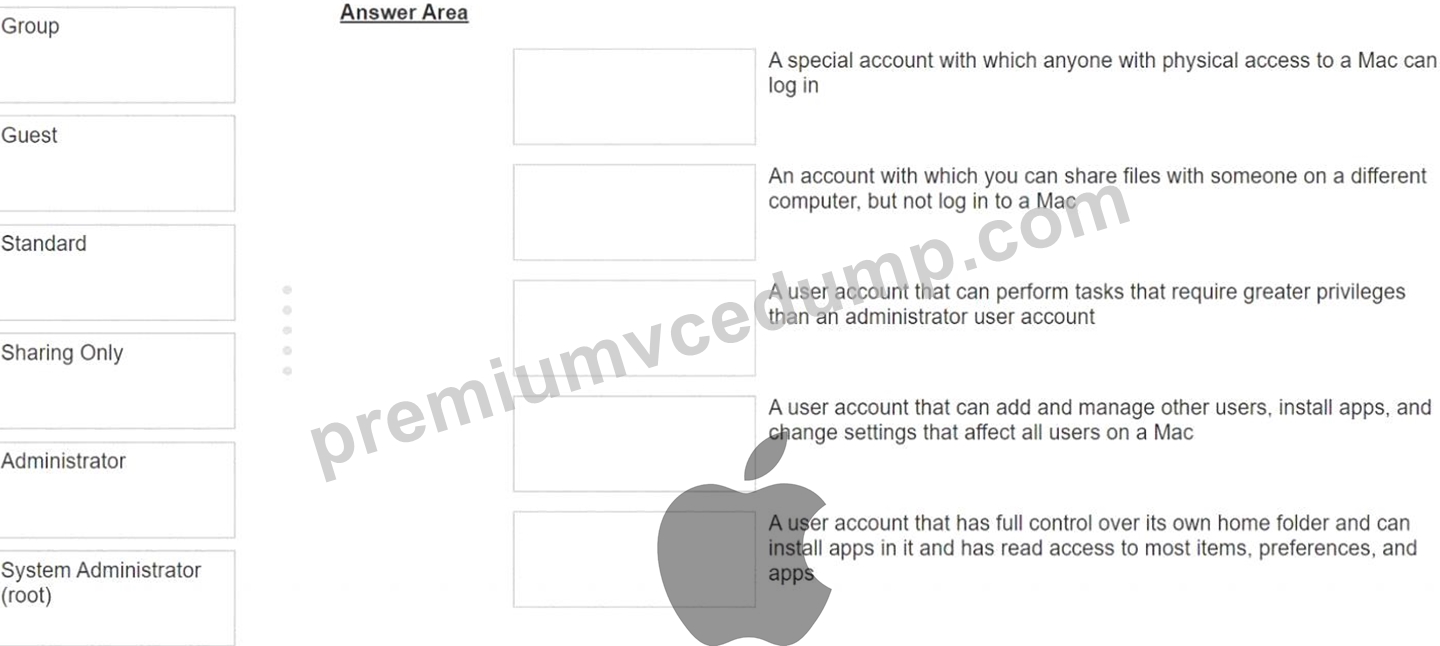
Answer:
Explanation: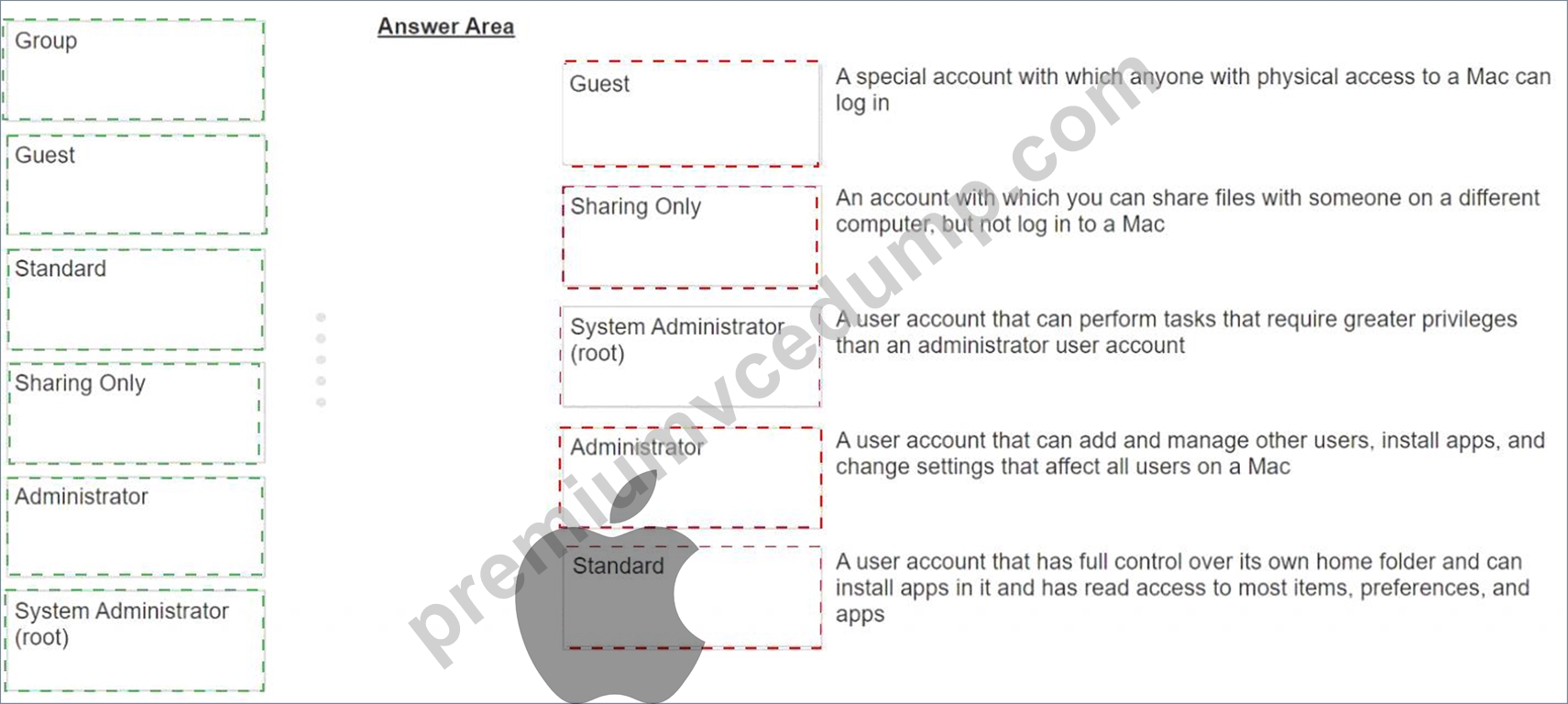
NEW QUESTION # 40
......
Apple-Device-Support Exam Dumps, Practice Test Questions BUNDLE PACK: https://examsites.premiumvcedump.com/Apple/valid-Apple-Device-Support-premium-vce-exam-dumps.html